

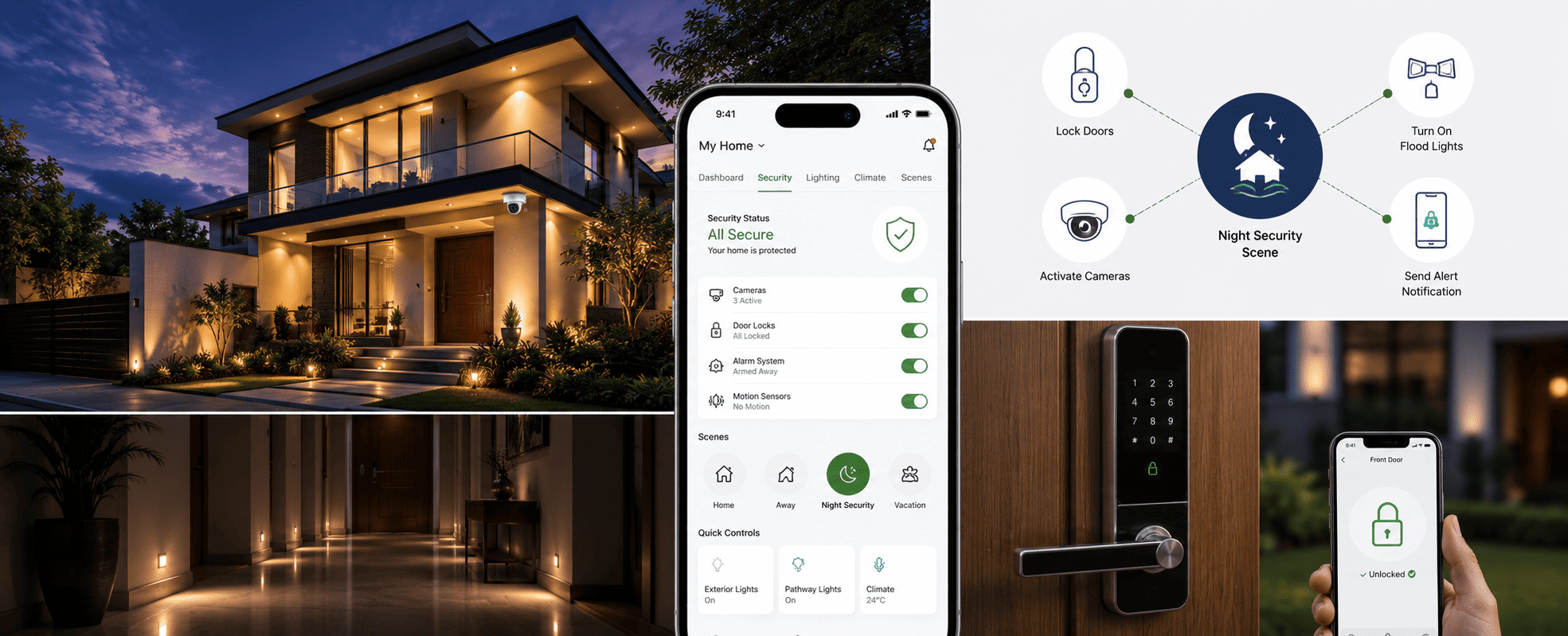
Smart home security becomes meaningfully "smart"
not when individual devices like cameras, sensors, and locks are simply
connected to an app, but when they're integrated into the same automation
system that controls lighting, climate, and access, allowing one event (like
an open door at night) to trigger a coordinated response across multiple
systems automatically.
In this guide, we look at what's typically included in a smart security setup, and more importantly, how these components work together when integrated into a KNX-based home automation system rather than operating as isolated devices.
What's Included in a Smart Home Security Setup?
A smart security setup is built from a combination of components, each of which can be added based on a household's specific needs:
- Surveillance cameras — real-time access via smartphone, with pan/zoom capability and remote viewing of any room
- Sensors — door/window sensors for entry detection, motion sensors that can differentiate between a person and a pet, and geofencing sensors that detect when a resident's phone enters or leaves a defined area around the property
- Alarms — configurable for different situations, from a quiet SMS alert (e.g., garage door left open) to a loud siren and call notification (e.g., fire alarm triggered)
- Smart locks — remote locking/unlocking, custom access codes for family members or staff, and a log of every entry
- Lighting control — floodlights for deterrence, pathway lighting for safe navigation at night, and automated lighting response during alarm events
Each of these is available as a standalone product. The
difference in a properly integrated system is what happens when they're
connected.
What's the Difference Between Standalone Smart Security and Integrated Home Automation Security?
This is the key distinction that determines how much value a
homeowner actually gets from "smart" security features:
Setup Type |
How It Works |
Example Response |
Limitation |
|
Basic security system |
Individual alarms/sensors, manual monitoring |
Door sensor triggers a siren |
No connection to other home systems |
|
Standalone smart security |
App-controlled devices, separate apps per brand |
Camera notification sent to phone |
Each device/app operates independently |
|
KNX-integrated security |
All security components share the same automation bus as
lighting, climate, and access |
Motion detected outside at night → exterior lights switch
on, interior lighting indicates the direction of the alert, and a
notification is sent — all from one triggered event |
Requires planning during system design, but enables
coordinated responses |
The third category is what we mean when we talk about
security being part of home automation rather than a separate system installed alongside it.
How Does Integration Make Security Responses Smarter?
The components listed above work well individually, but integration is what allows them to respond to each other:
- If an outdoor motion sensor detects movement at night and a door is left unlocked, the system can automatically lock it to prevent entry — rather than just sending an alert after the fact
- If a fire alarm is triggered in the kitchen, an integrated system can simultaneously cut power to electrical appliances in that zone, shut down HVAC airflow to that area to slow smoke spread, switch on lighting along escape routes, and send notifications — all as one programmed scene rather than five separate manual actions
- Geofencing can be used not just for alarm arming/disarming, but to trigger lighting and climate scenes as a resident approaches or leaves the property
This kind of coordinated response is programmed through the same ETS6 scene logic used for lighting, curtain, and climate automation — security becomes one more set of inputs and outputs on the same system, rather than a parallel network.
How Do Smart Locks Fit into an Integrated Security System?
Digital locks are often the most visible "smart security" upgrade, but their value increases significantly when integrated:
- Access logging feeds into the same dashboard used for monitoring the rest of the home, so unusual access patterns (e.g., a service entry code used at an unexpected time) can be flagged alongside other security alerts
- Geofence-based locking means the front door can lock automatically as a resident leaves, without requiring a separate action
- Scene-based access — for example, a "Staff Access" scene can simultaneously unlock a specific entry point, disable the alarm for that zone only, and log the access, rather than requiring three separate manual steps
How Does Lighting Support Security in an Automated Home?
Lighting is frequently underestimated as a security feature,
but in an integrated system, it serves two purposes:
- Deterrence
— floodlights triggered by motion sensors around the perimeter
- Guidance
during alerts — if an alarm is triggered, lighting
automation can illuminate exit routes automatically, which is
particularly relevant for fire alarm scenarios at night
Because lighting and security share the same KNX bus, these
responses don't require separate "security lighting" hardware —
existing lighting circuits become part of the security response when programmed
accordingly.
A Real Example: Integrated Security Scene Programming
On a villa project in Sector 50, Noida, we programmed a
"Night Security" scene that activates automatically after the last
interior motion is detected post-midnight: perimeter floodlights switch to
motion-triggered mode, all entry-point locks engage automatically if not
already locked, interior lighting drops to minimal pathway-only illumination,
and any motion detected after this point triggers a notification with the
relevant camera feed — all from sensors and devices that, individually, are
fairly standard security components.
Conclusion
The components of a smart security system — cameras,
sensors, alarms, locks, and lighting — aren't new on their own. What changes
the outcome is whether they're programmed to respond to each other as part of
one automation system, or simply installed as separate "smart"
products that each send their own notifications. For homeowners planning a new
automation system, security integration is worth discussing at the design
stage, since retrofitting these connections later is possible but less straightforward.
FAQs
Do I need to replace my existing cameras and sensors to integrate them into a home automation system?
Not always. Many existing IP cameras and sensors can be
brought into a KNX-integrated system through appropriate gateways, depending on
the protocols they support. This is assessed case-by-case during planning.
Is integrated security more expensive than standalone smart security devices?
The individual components are similarly priced; the
additional cost is in the integration and scene programming (via ETS6) that
connects them to the rest of the home automation system. This is typically
planned as part of the overall automation budget rather than a separate line
item.
Can geofencing accidentally disarm security if someone else carries my phone?
Geofencing is usually configured as one input among several,
not the sole trigger — for example, requiring both phone presence and a manual
confirmation, or using it only for convenience features (like pre-unlocking)
rather than fully disarming alarms.
How does this differ from the security and surveillance systems TechVault installs?
Our security and
surveillance services cover the hardware — CCTV, access control, intrusion
and fire alarms, video door phones, and intercoms. This guide focuses on how
those components are programmed to work together within a KNX home automation
system, rather than operating as separate systems.